更新系统
apt-get update && apt-get upgrade -y基础工具下载安装
apt update && apt -y install build-essential libnss3 libpcre3 libpcre3-dev zlib1g-dev git dbus manpages-dev aptitude g++ wget curl unzip gcc校准时间
ln -sf /usr/share/zoneinfo/Asia/Shanghai /etc/localtime && date -R下载安装GO编程语言
wget https://go.dev/dl/go1.19.3.linux-amd64.tar.gz解压至/usr/local/
tar -C /usr/local -xzf go1.19.3.linux-amd64.tar.gz在/etc/profile中添加 Go 环境变量:
echo "export PATH=$PATH:/usr/local/go/bin" >> /etc/profile使修改的配置文件立即生效
source /etc/profile编译安装 Caddy
go install github.com/caddyserver/xcaddy/cmd/xcaddy@latest编译安装(下面的插件感觉不需要的可以去掉)
~/go/bin/xcaddy build \
    --with github.com/caddyserver/forwardproxy@caddy2=github.com/klzgrad/forwardproxy@naive \
    --with github.com/abiosoft/caddy-exec \
    --with github.com/caddy-dns/cloudflare \
    --with github.com/mholt/caddy-l4 \
    --with github.com/greenpau/caddy-trace \
    --with github.com/hairyhenderson/caddy-teapot-module \
    --with github.com/kirsch33/realip \
    --with github.com/porech/caddy-maxmind-geolocation \
    --with github.com/mholt/caddy-webdav
删除编译后的文件夹
rm -rf go go1.19.3.linux-amd64.tar.gz创建文件夹
mkdir -p /usr/share/caddy/ /etc/caddy/ /etc/ssl/caddy/ /var/log/caddy/创建文件
touch /var/log/caddy/access.log /etc/caddy/Caddyfilemv ./caddy /usr/bin/修改Caddyfile h2
{
    order reverse_proxy before route
    admin off
    log {
        output file /var/log/caddy/access.log
    }
    servers :443 {
        protocol {
            experimental_http3
        }
    }
}

:443, t.caddy.tk {
    header Access-Control-Allow-Origin *
    php_fastcgi unix//run/php/php7.4-fpm.sock
    encode zstd gzip
    tls /etc/ssl/caddy/t.caddy.tk_bundle.crt /etc/ssl/caddy/t.caddy.tk.key {
        ciphers TLS_ECDHE_ECDSA_WITH_AES_256_GCM_SHA384 TLS_ECDHE_ECDSA_WITH_AES_128_GCM_SHA256 TLS_ECDHE_ECDSA_WITH_CHACHA20_POLY1305_SHA256
        alpn h2

    }

    @host {
        host t.caddy.tk
    }
    route @host {
        header {
            Strict-Transport-Security "max-age=31536000; includeSubDomains; preload"
        }
    }

    root * /usr/share/caddy
    file_server

    reverse_proxy /mywebsocket 127.0.0.1:26457 {
        transport http {
            versions h2c
        }
    }
}
支持grpc
{
    order reverse_proxy before route
    admin off
    log {
        output file /var/log/caddy/access.log
    }
    servers :443 {
        protocol {
            experimental_http3
        }
    }
}

:443, www.grpc.com {
    header Access-Control-Allow-Origin *
    php_fastcgi unix//run/php/php7.4-fpm.sock
    encode zstd gzip

    tls /etc/ssl/caddy/www.grpc.com_bundle.crt /etc/ssl/caddy/www.grpc.com.key {
        dns cloudflare hGV77cHVZ7u1pQF4uVCoEUPousi6SX0GOA8TDd3o
        ciphers TLS_ECDHE_ECDSA_WITH_AES_256_GCM_SHA384 TLS_ECDHE_ECDSA_WITH_AES_128_GCM_SHA256 TLS_ECDHE_ECDSA_WITH_CHACHA20_POLY1305_SHA256
        alpn h2
    }

    @host {
        host www.grpc.com
    }
    route @host {
        header {
            Strict-Transport-Security "max-age=31536000; includeSubDomains; preload"
        }
    }

    root * /usr/share/caddy
    file_server

    reverse_proxy /www.grpc.com/* 127.0.0.1:12345 {
        transport http {
            versions h2c
        }
        flush_interval -1
        header_up X-Real-IP {remote_host}
    }
}
支持websocket
{
    order reverse_proxy before route
    admin off
    log {
        output file /var/log/caddy/access.log
    }
    servers :443 {
        protocol {
            experimental_http3
        }
    }
}

:443, www.grpc.com {
    header Access-Control-Allow-Origin *
    php_fastcgi unix//run/php/php7.4-fpm.sock
    root * /usr/share/caddy
    file_server
    encode zstd gzip

    tls /etc/ssl/caddy/www.grpc.com_bundle.crt /etc/ssl/caddy/www.grpc.com.key {
        dns cloudflare hGV77cHVZ7u1pQF4uVCoEUPousi6SX0GOA8TDd3o
        protocols tls1.2 tls1.3
        ciphers TLS_ECDHE_ECDSA_WITH_AES_256_GCM_SHA384 TLS_ECDHE_ECDSA_WITH_AES_128_GCM_SHA256 TLS_ECDHE_ECDSA_WITH_CHACHA20_POLY1305_SHA256
        curves x25519
    }
    @host {
        host www.grpc.com
    }
    route @host {
        header {
            Strict-Transport-Security "max-age=31536000; includeSubDomains; preload"
        }
    }
    @mywebsocket {
        path /mywebsocket
        header Connection *Upgrade*
        header Upgrade websocket
    }
    reverse_proxy @mywebsocket localhost:12345

}
forward proxy
{
    order forward_proxy before route
    admin off
    log {
        output file /var/log/caddy/error.log
        level ERROR
    }
}

:443, www.forwardproxy.com {
    tls /etc/ssl/caddy/www.forwardproxy.com.crt /etc/ssl/caddy/www.forwardproxy.com_key.key {
        ciphers TLS_AES_256_GCM_SHA384 TLS_AES_128_GCM_SHA256 TLS_CHACHA20_POLY1305_SHA256 TLS_ECDHE_ECDSA_WITH_AES_256_GCM_SHA384 TLS_ECDHE_ECDSA_WITH_AES_128_GCM_SHA256 TLS_ECDHE_ECDSA_WITH_CHACHA20_POLY1305_SHA256
        curves x25519 secp521r1 secp384r1 secp256r1
    }
    root * /usr/share/caddy/wordpress
    php_fastcgi unix//run/php/php7.4-fpm.sock
    file_server
    encode gzip

    @disallowed {
        path /xmlrpc.php
        path *.sql
        path /wp-content/uploads/*.php
    }

    rewrite @disallowed '/index.php'
    forward_proxy {
        basic_auth user password
        hide_ip
        hide_via
        probe_resistance
    }
    @host {
        host www.forwardproxy.com
    }
    route @host {
        header {
            Strict-Transport-Security "max-age=31536000; includeSubDomains; preload" #启用HSTS
        }
    }
}
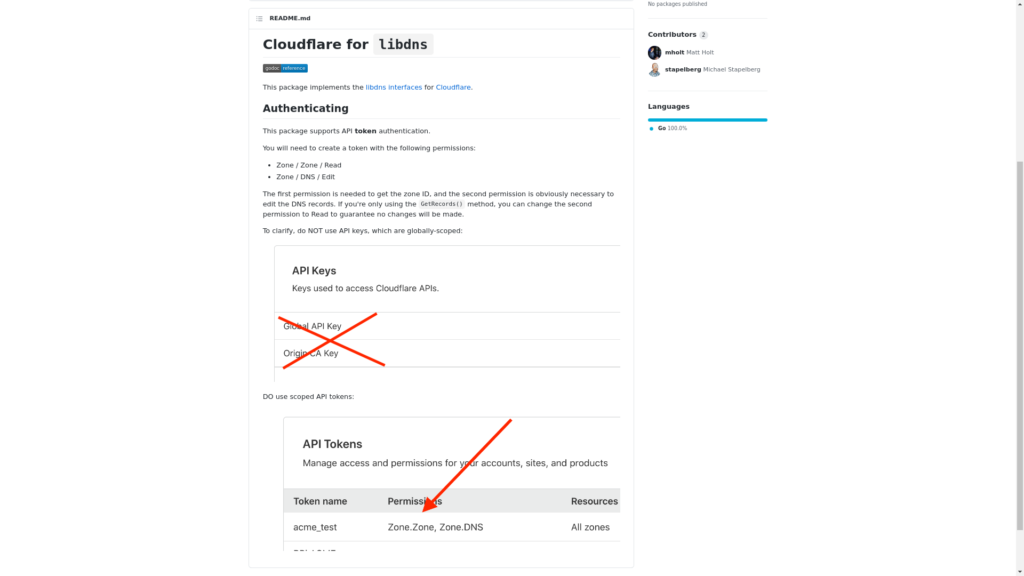
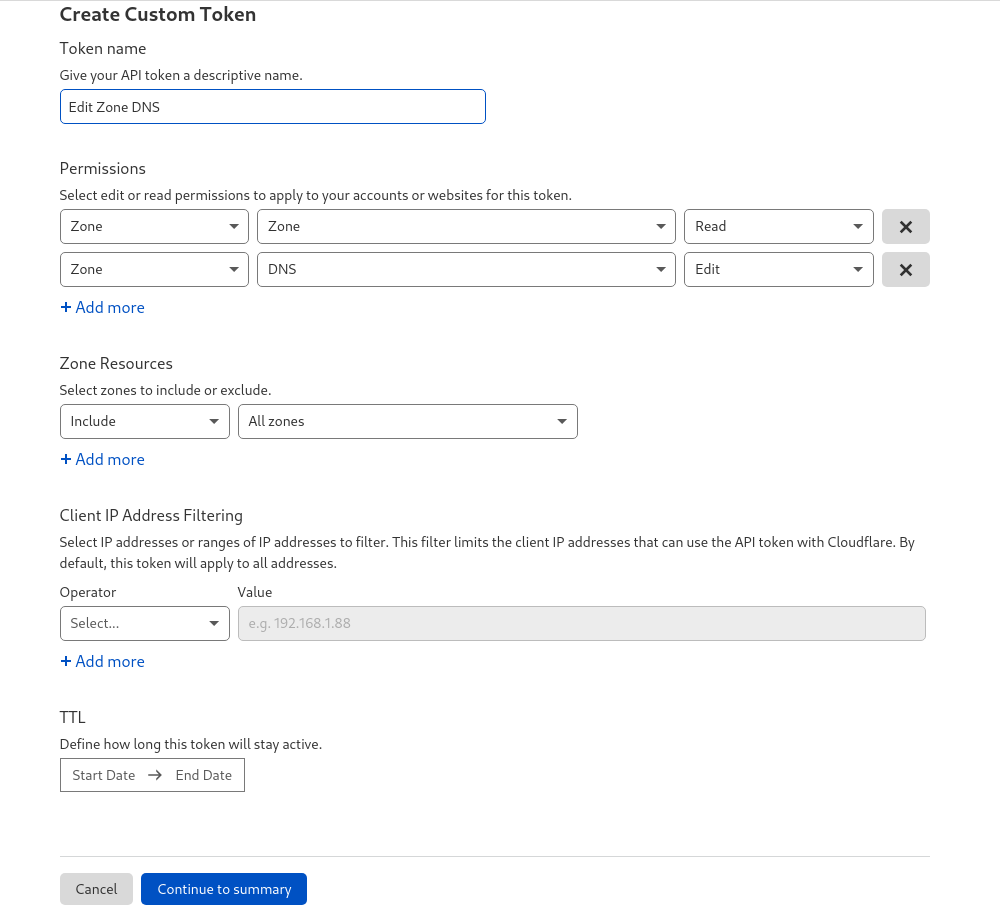
获得 Cloudflare API token
在 Cloudfalre 网站点击右上角 人物图—>MY Profile——> (最左边找到 { } 这个标志)API 选项 或 https://dash.cloudflare.com/profile/api-tokens
.
创建caddy.service
cat >/etc/systemd/system/caddy.service <<EOF
[Unit]
Description=Caddy
Documentation=https://caddyserver.com/docs/
After=network.target network-online.target
Requires=network-online.target

[Service]
Type=notify
User=www-data
Group=www-data
ExecStart=/usr/bin/caddy run --environ --config /etc/caddy/Caddyfile
ExecReload=/usr/bin/caddy reload --config /etc/caddy/Caddyfile --force
TimeoutStopSec=5s
LimitNOFILE=1048576
LimitNPROC=512
PrivateDevices=yes
PrivateTmp=true
ProtectSystem=full
AmbientCapabilities=CAP_NET_BIND_SERVICE

[Install]
WantedBy=multi-user.target
EOF
创建caddy-api.service
cat >/etc/systemd/system/caddy-api.service <<EOF
[Unit]
Description=Caddy
Documentation=https://caddyserver.com/docs/
After=network.target network-online.target
Requires=network-online.target

[Service]
Type=notify
User=www-data
Group=www-data
ExecStart=/usr/bin/caddy run --environ --resume
TimeoutStopSec=5s
LimitNOFILE=1048576
LimitNPROC=512
PrivateTmp=true
ProtectSystem=full
AmbientCapabilities=CAP_NET_BIND_SERVICE

[Install]
WantedBy=multi-user.target
EOF
安装MariaDB php:
apt install php-fpm php-mysql mariadb-server安装php插件:
apt install php-curl php-gd php-imagick php-intl php-mbstring php-zip php-domMariaDB安全加固:
会设置密码,界面1直接回车,剩的都选Y:
mysql_secure_installationroot登录:
mysql -u root -p查看当前的数据库:
show databases;创建数据库非root用户名密码:
**wordpress 数据库名, name 用户名,password 密码 **
create database wordpress; create user name@localhost identified by ‘password’;
授予权限:
grant all privileges on wordpress.* to name@localhost; flush privileges;退出:
exit博客下载地址 https://typecho.org/ 解压放在/usr/share/caddy/文件夹下,
用的非root账户要给html文件夹赋给权限:
chown -R www-data:www-data caddy开启BBR加速(可跳过)
echo "net.core.default_qdisc=fq" >> /etc/sysctl.conf && echo "net.ipv4.tcp_congestion_control=bbr" >> /etc/sysctl.conf && sysctl -p && lsmod | grep bbr====出现缓冲过小错误时====
建议通过运行来增加最大缓冲区大小:
sysctl -w net.core.rmem_max=2500000重载systemctl服务
systemctl daemon-reload开启caddy2
systemctl start caddy && systemctl status caddy设置为开机自动启动
systemctl enable caddy每次修改后都要执行一次重启
systemctl restart caddy停止caddy
service caddy stop开启php7.4-fpm:
systemctl start php7.4-fpm开启状态:
systemctl status php7.4-fpm开机自动启动:
systemctl enable php7.4-fpm重新启动:
systemctl restart php7.4-fpm开启mysql:
systemctl start mariadb.service开启状态:
systemctl status mariadb.service开机自动启动:
systemctl enable mariadb.service重新启动:
systemctl restart mariadb.service从 Caddyfile 生成 JSON 配置
./caddy adapt --config ./Caddyfile --pretty直接内容输出到文本
./caddy adapt --config ./Caddyfile > ./config.json验证 Caddyfile 有效性
./caddy adapt --config ./Caddyfile --validate** grpc**
{
  "log": {
    "loglevel": "warning",
    "error": "/var/log/某x/error.log",
    "access": "/var/log/某x/access.log"
  },
  "inbounds": [
    {
      "listen": "127.0.0.1",
      "port": 12345,
      "protocol": "vless",
      "settings": {
        "clients": [
          {
            "id": "a6f4466a-d7a2-92fc-9ec6-8e098eed78c9",
            "alterId": 0
          },
          {
            "id": "b6f4466a-d7a2-92fc-9ec6-8e098eed78c9",
            "alterId": 0
          },
          {
            "id": "c6f4466a-d7a2-92fc-9ec6-8e098eed78c9",
            "alterId": 0
          }
        ],
        "decryption": "none"
      },
      "streamSettings": {
        "network": "grpc",
        "security": "none",
        "grpcSettings": {
          "serviceName": "www.grpc.com"
        }
      },
      "sniffing": {
        "enabled": true,
        "destOverride": [
          "http",
          "tls"
        ]
      }
    }
  ],
  "routing": {
    "rules": [
      {
        "type": "field",
        "protocol": [
          "bittorrent"
        ],
        "outboundTag": "blocked"
      }
    ]
  },
  "outbounds": [
    {
      "protocol": "freedom",
      "settings": {}
    },
    {
      "tag": "blocked",
      "protocol": "blackhole",
      "settings": {}
    }
  ]
}